
Mi LUMA
Luma Energy DevelopmentHouse & Home
3.7405.00 Reviews
- Version
- 1.18.8
- Installs
- 500.00K
- Age Rating
- Everyone
Screenshots
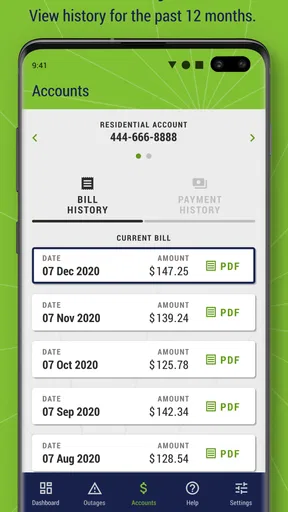
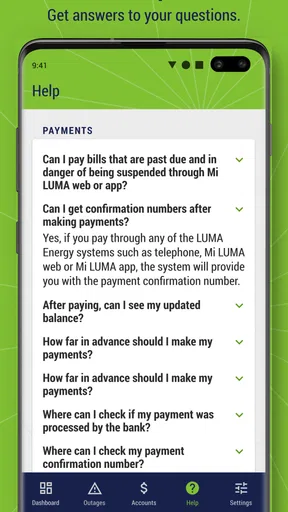
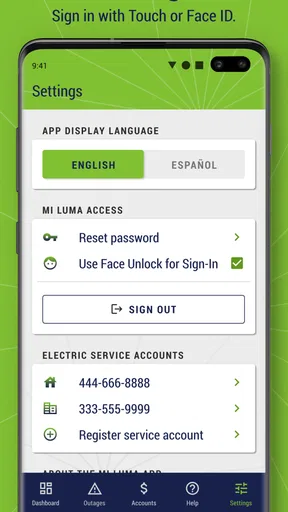
Our Review of Mi LUMA
 Analysis by Appyee
When a power bill becomes urgent, the most useful app is usually the one that removes a few small obstacles at exactly the right moment. That is where Mi LUMA makes its case. This free House & Home app from Luma Energy Development brings bill payment, a year of bill and payment history, and outage reporting into one place. I found its strongest idea is not that it replaces every way of managing household electricity, but that it gives LUMA customers a direct route to the tasks they are most likely to need.
I would describe it as a practical account companion rather than a complete home-energy management tool. It is aimed at people who want to check what they owe, look back at previous charges, or tell the utility about a service interruption without searching through several unrelated channels. That focused purpose is also its main limitation: if you want detailed energy analysis, appliance-level tracking, or broader household budgeting, this is not the kind of app I would choose.
Why outage reporting is the feature that matters most
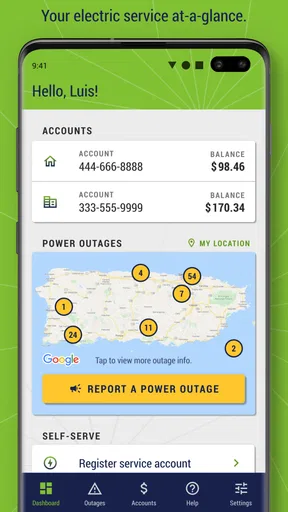
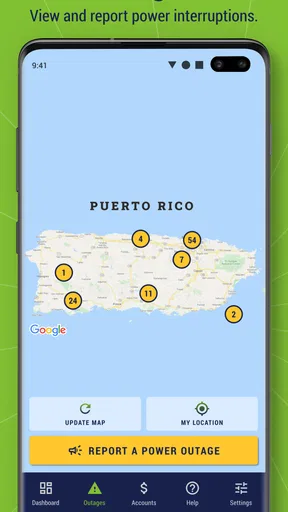
Paying a bill is important, but it is a scheduled task. An outage is different. It often happens when you are busy, away from a computer, or trying to work out whether the problem affects only your home or the surrounding area. The ability to report an outage from the same LUMA account app gives the service a more immediate role in everyday life.
In my experience, the value of this feature is mostly about reducing hesitation. Instead of wondering which phone number to call or where to find the correct web page, I can open the utility’s app and start from the service already connected to my account. That does not make a power interruption less inconvenient, and it should not be mistaken for a repair-status tool, but it creates a clear first action when the lights go out.
The distinction is useful. An outage report is a way to notify LUMA; it is not a promise that the app can restore service, estimate a repair time, or diagnose the cause inside the home. I would still check the electrical panel and make sure the issue is not limited to one breaker before reporting. If nearby homes are also dark, the app becomes especially convenient because I can send the report without treating the situation as a billing problem.
This is the capability that gives Mi LUMA a reason to stay installed. Bill payment can be handled through other routes, but an outage workflow is easier to appreciate when it is already available on the phone I carry. The app’s content rating is Everyone, which also makes its straightforward utility feel suitable for a broad household audience, including someone who may only open it occasionally.
Using the app when the household is in a hurry
Imagine coming home after work and finding that the refrigerator is silent, the Wi-Fi is down, and the room is getting warm. In that moment, I do not want to reconstruct my account details from an old paper bill. I want to open one official-looking place, locate the outage option, and submit the report with as little wandering as possible. That is the kind of situation in which Mi LUMA feels more useful than a general payment service.
The same scenario shows why keeping account information current matters. If the app is already set up and I know which service account belongs to the address, the report is a quick administrative step. If I install it for the first time during the interruption, the experience may be slower because I still have to identify the correct account and move through the sign-in process. My practical advice is to install and configure the app before an emergency, then keep the phone charged and the account details accessible.
I also would not use the outage button as a substitute for basic safety decisions. Downed lines, sparks, smoke, or a dangerous electrical smell call for immediate distance and appropriate emergency help, not just an in-app report. Mi LUMA is best viewed as a communication channel for a service interruption, not as an emergency response guide.
How the everyday account workflow fits together
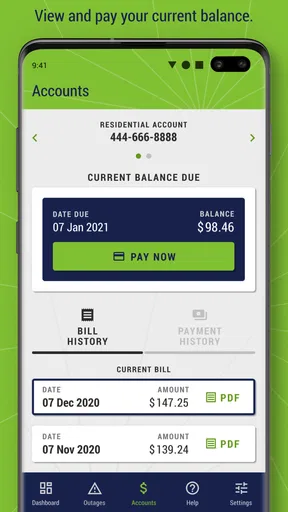
The rest of the app supports the same idea of centralizing routine utility tasks. I can pay the LUMA bill from the account area, then return later to review the bill and payment history covering twelve months. That combination is more useful than a payment-only screen because it gives me a basic record of what happened after I paid.
I like the history feature for checking patterns in my own household without building a separate spreadsheet. If a bill seems higher than expected, looking back across previous months can help me decide whether the change is unusual or part of a recurring pattern. It will not explain every cause by itself, but it gives me a starting point for asking better questions rather than reacting to one number in isolation.
A small but important habit is to use the history before making a payment when something looks wrong. I would compare the current bill with earlier entries, check whether a previous payment appears in the record, and only then decide whether to pay again or contact support. This is a useful safeguard against duplicate action when I am unsure whether a transaction has gone through. The app makes the record easier to consult, although I would still keep any confirmation shown after payment until the account history reflects the change.
The twelve-month window is also a sensible middle ground. It is long enough to compare seasons and recent household changes, while remaining focused on information that is likely to be relevant now. People who need a multi-year archive for taxes, rental documentation, or a detailed property history may still want to save their own records separately. I would not treat the in-app history as the only archive for important paperwork.
What payment feels like in the wider workflow
I see payment as the app’s most straightforward function, but its real advantage comes from being beside the history and outage tools. A standalone payment method can complete one transaction, while Mi LUMA can help me connect that transaction with the account’s recent activity. That context matters when several people in a household share responsibility for bills or when I am checking whether an older payment was credited.
For a simple monthly routine, I would open the app, review the current balance, glance at the recent record if needed, and complete the payment. I would avoid treating the app as a financial planner, though. It is not a replacement for a household budget, a reminder system, or a bank’s transaction ledger. Its job is narrower: help me interact with the LUMA account and understand its recent bill activity.
That narrowness can be a strength for someone who dislikes complicated utility portals. There are fewer reasons to search around, and the three main tasks are easy to understand conceptually. On the other hand, users who prefer paying every bill through their bank’s automatic bill-pay service may see little reason to change. If your bank already handles payments reliably and you never report outages through an app, Mi LUMA offers less additional value.
Checking the app before relying on it
Mi LUMA is available at no cost, and its current version is 1.18.8. It was released on May 27, 2021, and works on Android 7.0 or later. Those details make it accessible to many existing Android phones, but I would still update the operating system and app when possible, especially before depending on it during a service interruption.
The app has passed the half-million-install mark and holds an average rating of 3.7 from around 1.7 thousand ratings, with more than four hundred written reviews. I read that combination as a sign of a useful but not universally smooth experience. A middling average does not tell me whether a problem came from billing, login, outages, or a particular phone, so I would not use the score alone to decide. The more sensible test is whether its focused tasks match my needs.
I would also prepare a backup route. A utility app can be convenient, but a login issue, an outdated device, a weak connection, or a service-side problem can make any app unavailable at the wrong time. Keeping the official LUMA contact method available is sensible, particularly for urgent outage reporting. This is not a criticism unique to Mi LUMA; it is simply the trade-off of relying on a digital doorway for an essential service.
The best use case: a customer who wants one reliable utility shortcut
The strongest audience is a LUMA customer who manages a household account from an Android phone and wants three things close together: payment, recent records, and outage reporting. I would recommend it most readily to someone who pays bills manually, moves between homes or service addresses, or regularly needs to verify whether a payment has appeared on the account.
It is particularly helpful for a person who does not want to remember separate web addresses or keep paper bills nearby. A family member who usually handles the electricity account can also use the history to answer practical questions from another household member, such as whether a recent payment was recorded or whether the latest bill differs from earlier ones. The app does not solve the conversation, but it makes the account information easier to consult.
Another good use is preparing before hurricane season or another period when service interruptions are more likely to disrupt plans. I would install the app while the connection is working, finish the account setup, and make sure I know where the outage-reporting option is located. That preparation turns the app from something I search for under pressure into a familiar tool. It is a modest step, but it is one of the more valuable ways to use a utility app.
There is also a useful trade-off for people with limited storage or older devices. Because Mi LUMA concentrates on account actions instead of presenting a large collection of energy dashboards, it should be easier to understand than a broader smart-home platform. Still, the minimum Android requirement means phones below Android 7.0 are not a fit. Owners of very old devices should use another LUMA channel rather than assuming the app will install.
When another option is better
I would skip Mi LUMA if my main goal is to analyze electricity consumption in detail. The app’s stated purpose centers on bills, payment history, and outage reporting, not appliance monitoring, live usage graphs, solar production, or automated energy-saving recommendations. A smart-meter dashboard or a dedicated home-energy service would be a better match for those questions.
I would also stay with a bank’s bill-pay system if I already have automatic payments arranged and rarely need to open the LUMA account. The bank may be more convenient for someone who wants every household bill in one place. The compromise is that a general payment service usually does not give the same direct connection to outage reporting and utility-specific history.
People who manage several properties should think about their workflow before installing it. The app may be useful when I need to handle a LUMA account, but a property-management platform or carefully organized document system may be better for comparing multiple addresses, storing long-term records, and coordinating payments with tenants. Mi LUMA is designed around the utility relationship, not around broader property administration.
Finally, anyone who expects an outage map, restoration forecast, or technical diagnosis should adjust expectations. The practical benefit is the ability to report the interruption, not a complete incident-management center. That difference does not make the feature unhelpful; it simply tells me where the app fits in the process and where I still need another source of information.
My recommendation after using it as a household utility tool
Mi LUMA succeeds because it focuses on a small set of tasks that matter to LUMA customers. Paying a bill is convenient, the twelve-month history provides useful context, and outage reporting is the feature with the clearest real-world value. I especially like the idea of preparing the app before a disruption, since that is when a simple account shortcut can save the most time.
My opinion is positive but measured. The app is not a replacement for detailed energy monitoring, a bank’s complete bill organizer, or emergency assistance. Its average rating of 3.7 suggests that the experience may not be perfect for everyone, so I would keep a backup contact route and avoid making it my only record of important payments. Those are reasonable precautions for any utility account.
For the right user, however, the free download earns its place on the phone. If I were a LUMA customer who wanted to pay directly, inspect recent bills, and report an outage without navigating several separate systems, I would install it and complete the setup in advance. The best reason to use Mi LUMA is not convenience in the abstract; it is having the right account action ready when a household problem needs a quick response.
Verdict
Strengths of Mi LUMA
- Simple interface makes core features easy to find.
- Useful for keeping LUMA-related information in one place.
- Notifications can help users stay updated on important activity.
- Lightweight design should work well on many modern devices.
- Convenient access to account or service features while away from a computer.
Limitations of Mi LUMA
- Some features may require an active Mi LUMA account or subscription.
- The app’s usefulness depends heavily on available LUMA services in your area.
- Notifications may become distracting if too many alerts are enabled.
- Certain functions may work less smoothly on older phones.
- Users may need to share personal data to access the full experience.
Similar Picks in This Category
View All
Universal TV Remote Control
CodeMatics Media Solutions3.9

AlfredCamera Home Security app
Alfred Systems Inc.4.7

Planner 5D: AI Home Design
Planner 5D4.5

Universal Tv Remote-Cast to TV
One Music Player4.1

Zillow: Homes for Sale & Rent
Zillow Group4.8

99acres Buy/Rent/Sell Property
infoedge.com4.3
Frequently Asked Questions
What is Mi LUMA and what can I use it for?
Mi LUMA is the official mobile application for managing services connected with LUMA Energy. After installing it, users can typically review account information, check balances or bills, make payments, monitor electricity usage, receive service notifications, and report certain issues. The exact tools available may depend on your account type, location, and the services currently supported by LUMA. It is designed to make routine account management more convenient than using the website or contacting support.
Do I need a LUMA Energy account to use the application?
Most of Mi LUMA’s account-related features require you to sign in with an existing LUMA Energy account or register using information associated with your electric service. Without signing in, some general information or public service options may still be available, but you should not expect to view private billing details, manage payments, or access personalized usage data. Have your account number and contact information ready during registration.
Can I pay my electricity bill through Mi LUMA?
Mi LUMA is intended to provide convenient access to billing and payment services, allowing eligible customers to review amounts due and submit payments from a mobile device. Before relying on the app for an urgent payment, check the displayed due date, payment confirmation, and processing status carefully. Availability of payment methods, processing times, fees, and automatic-payment options can vary, so verify the final details shown in the application.
Can Mi LUMA show outages or help me report a power problem?
One of the most useful reasons to install Mi LUMA is to stay informed about service interruptions and contact LUMA regarding electricity problems. Depending on your area and the current version of the app, you may be able to view outage information, receive updates, report an outage, or check restoration estimates. These estimates are not guarantees, and emergency situations such as downed power lines should always be reported through the appropriate emergency channel.
Is Mi LUMA free, and is it safe to install?
Mi LUMA is generally available as a free download, although normal mobile data charges may apply when you use it away from Wi-Fi. Because the application can handle sensitive account and payment information, download it only from the official Google Play Store or Apple App Store and confirm that the publisher is LUMA Energy. Keep your device updated, use a strong password, and avoid sharing login or payment details through unofficial messages.
